
|
 |

Code Free Sony DVP-NS725P DVD/CD Player
With Progressive Scan, Dolby 5.1The Sony DVP-NS725P offers outstanding performance and value, whether you're shopping for your first player or upgrading. Sony's advanced Precision Cinema Progressive� de-interlacer is able to detect image changes at the pixel level. So, whether the DVD you're watching was sourced from film or video, the DVP-NS725P has the processing power to deliver flawless, fluid progressive-scan images every time!
To enjoy the subtle detail, natural color gradations, and filmlike smoothness of progressive scan technology you'll need to connect the DVP-NS725P to an HDTV or HDTV-ready TV . Or you can select "interlaced scan" for a beautifully sharp picture on your standard TV. For thrilling 5.1-channel sound, simply connect this player to a Dolby� Digital/DTS� receiver.
The DVP-NS725P pulls double duty as an excellent high-quality music machine. It plays your regular CDs, plus CD-Rs & CD-RWs, and MP3 discs. And playing MP3 files is especially easy. Just insert an MP3-encoded disc and press "Menu." A blue screen pops up to display your folders. Using the remote or front-panel cursor control, scroll down the list to select the folder you want. Another screen pops up to show the files in the selected folder. Select the file you want to hear, and enjoy!
Important Notice about TV Compatibility - Please Read
This codefree DVD player can play both PAL and NTSC discs providing you have a NTSC and PAL multisystem TV. For example, if you live in the USA you will only be able to play PAL region 2 discs from Europe if your TV can play PAL.Watch movies from all zones 1 - 6 with the progressive scan region free Sony DVP-NS715P dvd player. This code free dvd player can play both PAL and NTSC discs enabling you to watch both USA and European discs on one machine providing you have a multi system TV.
Key Features of the Sony DVP-NS725P:
- Plays Discs from all Regions: 1, 2, 3, 4, 5, and 6
- Hardware Chip Modification
- Plays REA and RCE Discs
- Progressive Scan Output
- FBI Skip - Ability to skip through the FBI warning screens
- DVD-Video, DVD-R & DVD-RW, DVD+R & DVD+RW, and Video CD
- CD, CD-R & CD-RW, and MP3 CD-R & CD-RW
- 108MHz/12-bit video D/A converter
- selectable interlaced/progressive-scan component video output
- Precision Cinema Progressive de-interlacer with 3-2 pulldown processing
- Precision Drive 2 system
- SmoothScan and SmoothSlow search modes
- 10-second Instant Replay
- TV Virtual Surround for enhanced 2-speaker sound
- optical and coaxial digital outputs for Dolby Digital/DTS/PCM
- 1 set of A/V outputs (composite, S-video, and 480i/480p component video)
- multibrand remote (operates most TVs)
- 192kHz/24-bit audio D/A converter
- audio signal-to-noise ratio 115 dB
- 16-7/8"W x 2-3/16"H x 10-9/16"D
- warranty: 1 year parts, 90 days labor
- designed for use with "Region 1" coded DVDs
Disc Compatibility: This unit can play the following discs:
- DVD: Plays Region 1 or "All-Region" DVD Video discs, DVD-R or DVD-RW in video mode, DVD+R or DVD+RW
- Video CD: 5" or 3" VCD, Super VCD, CD-R or CD-RW in Video CD or Super Video CD format
- Audio CD: 5" or 3" Audio CD, CD-R, CD-RW in music CD format, CD-R/CD-RW with MP3 Files
Precision Drive 2 System: Previous versions of Precision Drive were only able to compensate for warped discs by moving the entire optical block, which took more time and limited the amount of correction possible. The new Precision Drive 2 system simplifies the process by moving the lens instead of the entire optical block for faster, more accurate error correction. Precision Drive 2 features Dynamic Tilt Compensation which corrects for disc orientation during playback. This method is simpler, faster, and able to correct for an even wider range of disc imperfections.
Precision Cinema Progressive (PCP) Technology: Other DVD players detect image changes at the scan line level. Sony's Precision Cinema Progressive (PCP) system detects them at the pixel level. The picture is more faithful to the source--whether film or video--because separate, optimized algorithms are used to handle the differing pixel behavior. Separate algorithms are also used to process the moving and still parts of an image, resulting in sharp backgrounds with moving objects that are free from motion artifacts.
192kHz/24-bit Audio D/A Converter: This player features a 192kHz/24-bit audio D/A converter.
108MHz/12-bit Video D/A Converter: The high-speed 108MHz/12-bit video D/A converter employs 4X oversampling for much more effective noise filtering. The result is smoother gradation and a more realistic picture.
Progressive Scan Output: The component video output on this unit can be used to send 480p progressive scan signals to a progressive scan capable television. In contrast to the 30 frames shown per second by the interlaced format, the progressive format displays 60 frames per second for more detailed images. This unit allows you to fine tune the Progressive video output using the following conversion modes:
- Normal (Interlace): Select this when the unit is connected to a standard (Interlace format) TV
- Progressive Auto: Normally, select this mode when connected to a Progressive Scan-capable TV. It will automatically detect if you are playing Film-based software (shot at 24 frames per second) or Video-based software (shot at 30 frames/60 fields per second), and convert the signal to the appropriate conversion mode.
- Progressive Video: When connected to a progressive TV, this choice sets the conversion mode for Video-based software, regardless of the type of software you are playing.
- Progressive Film: When connected to a progressive TV, this choice sets the conversion mode for Film-based software, regardless of the type of software you are playing. Note: This unit uses Full 3-2 Reverse Conversion when converting Film-based software to a Progressive Scan video signal.
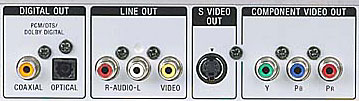
Component Video Output: In addition to the composite and S-video outputs, this unit is equipped with a set of component video outputs. When connected to a television with a component video input, the component video output of this unit will provide picture color and detail that is superior to video from composite and S-video outputs. The component video output may be set for interlaced or progressive scan operation.
Digital Video Enhancer: The Digital Video Enhancer makes the picture appear clear and crisp by enhancing the outlines of images on your TV screen. You can select one of three levels; each level enhances the outline more than the previous level. In addition, you can select "Soft", which softens the image, or the Digital Video Enhancer can be turned off.
Block Noise Reduction (BNR): The BNR function adjusts the picture quality by reducing the "block noise" or mosaic-like patterns that appear on your TV screen.
Custom Picture Mode: You can choose from the following Custom Picture Mode settings:
- Standard: displays a standard picture
- Dynamic 1: produces a bold dynamic picture by increasing the picture contrast and the color intensity
- Dynamic 2: produces a more dynamic picture than Dynamic 1 by further increasing the picture contrast and the color intensity
- Cinema 1: enhances details in dark areas by increasing the black level
- Cinema 2: white colors become brighter and black colors become richer, and the color contrast is increased
- Memory: allows you to individually adjust and store the following settings: picture, brightness, color, and hue
TV Virtual Surround (TVS): TV Virtual Surround generates a convincing surround sound effect using only two stereo speakers, with a stereo receiver or directly out of the television speakers. You can turn this feature Off or you can select one of the following settings:
- TVS Dynamic: uses sound imaging to create a single set of virtual rear speakers. This mode is effective when using speakers that are close together, such as on a television.
- TVS Wide: uses sound imaging to create multiple virtual rear speakers. This mode is effective when using speakers that are close together, such as on a television.
- TVS Night: The large sounds, such as explosions, are suppressed, but the quieter sounds are unaffected.
- TVS Standard: uses sound imaging to create multiple virtual rear speakers. This mode is effective when using separate front speakers that are far apart.
On-screen Display: The on-screen menu language can be set to English, French, Spanish, or Portuguese.
DVD/CD Text: When playing a DVD or CD encoded with text, this unit will display the text information.
MP3 Playback: This unit will play MP3 files recorded onto CD-ROM, CD-R and CD-RW discs using the ISO 9660 level 1/level 2, or Joliet formats. The unit's on-screen display makes the selection of folders and files quick and easy.
PBC (Playback Control) Playback: PBC playback allows you to play Video CDs interactively by following the menu on the TV screen.
Multi-Angle Display: This function allows you to choose the viewing angle of scenes that were shot from a number of different angles. Note: This function is limited to DVDs recorded with multiple camera angles.
Direct Search: You can search a DVD by title or chapter, and you can search a Video CD or CD by track, index or scene. Because titles and tracks are assigned unique numbers on the disc, you can select the desired one by entering its number (on the remote). You can also search for a scene on a DVD by entering the time code.
Picture Navigation: You can divide the screen into 9 subscreens and find the desired scene quickly. This feature allows you to view pictures of the disc's titles (Title Viewer), chapters (chapter viewer) or tracks (track viewer) on a single screen divided into 9 sections and start playback from the chosen title, chapter or track.
Multi-disc Resume: The player stores the point where you stopped the disc for up to 6 discs and resumes playback from the stored location the next time you insert the same disc. The resume playback point is cleared for a disc when you change the play mode or you change the settings on the Setup Display while the disc is playing. Note: This feature does not work for audio CDs or MP3 CDs.
Instant Replay: The Instant Replay function is useful when you want to review a scene or dialogue that you missed. With a single press of the Replay button, the player will go back 10 seconds and begin playing again.
Program Play: Up to 99 titles, chapters and tracks can be programmed and played in any order.
Shuffle Play: When playing a DVD, you can play the titles or chapters in random order. When playing a Video CD or an audio CD, you can play the tracks in random order. In addition, you can play the titles/chapters or tracks in Program Play in random order.
Repeat Play: "A-B Repeat" allows you to select any portion of a title, chapter, or track and play that portion repeatedly. When playing a DVD, you can repeat the current title, current chapter, or the entire disc. When playing a Video CD or an audio CD, you can repeat the current track or the entire disc. When playing an MP3 disc, you can repeat the current album, current track or the entire disc. In addition, you can repeat Program Play and Shuffle Play.
Scan Search: When playing a DVD, there are four fast play speeds in either direction. On a Video CD, there are three fast play speeds in either direction. You can play a CD forward only in three fast play speeds.
Slow Motion: When playing a DVD or Video CD, you may move forward through the program being played in one of two slow motion speeds. When playing a DVD, you may move backward through the program being played in one of two slow motion speeds.
Freeze Frame: When a DVD or Video CD is in the pause mode, you can advance forward one frame at a time. On a DVD, you can also advance backward one frame at a time.
Parental Control: This unit allows you to set two kinds of playback restrictions for DVDs using Parental Control and Custom Parental Control. Parental Control allows you to restrict playback according to a predetermined level. You can select a parental control rating from 0-8, which is protected by a 4-digit password. Using the same registered password, Custom Parental Control allows you to set playback restrictions for a specific disc. You can set the same Custom Parental Control password for up to 40 discs.
Child Lock: You can lock the disc tray to prevent a child from opening it.
Screen Setup:
- TV Type: Allows you to set the aspect ratio of the connected TV. You can choose from 4:3 Letter Box, 4:3 Pan Scan or 16:9.
- Screen Saver: The screen saver image appears when you leave the player in pause or stop mode for 15 minutes, or when you play back a CD or MP3 CD for more than 15 minutes. The screen saver can be turned On or Off.
- Background: You can select the background color in stop mode, or while playing a CD or an MP3. You can choose Jacket Picture (shows the DVD jacket picture if supported by the DVD), Graphics (shows a preset graphic), Blue (background color is blue), or Black (background color is black).
- Black Level: You can set the black level for the video signals output from the composite and S-Video jacks.
- Black Level (Component Out): You can separately set the black level for the video signal output from the component video jacks. This function is not available when the player outputs a progressive scan signal.
Custom Setup:
- Auto Power Off: When this feature is turned on, the player enters standby mode after being left in stop mode for more than 30 minutes.
- Auto Play: This functions is useful when the player is connected to a timer (not included). When Auto Play is turned on, playback automatically starts when the unit is turned on.
- Dimmer: You can set the display to Bright or Dark.
- Pause Mode: You can select from Auto (no jitter) or Frame (high resolution) for the type of picture output in pause mode.
- Track Selection (DVD only): You can select Auto or Off. When Auto is selected, priority is given to the digital audio track with the largest number of channels.
- Multi-Disc Resume: This feature (described above) can be turned on/off.
Audio Setup:
- Audio ATT (attenuation): You can select On or Off. When On is selected, the unit lowers the level of the analog audio outputs to prevent distortion.
- Audio Dynamic Range Control (DVD only): You can select Standard, TV Mode (compresses the dynamic range for late night listening), and Wide Range (no compression for the highest dynamic range).
- Down Mix (DVD only): This functions switches the mixing method, so "Dolby Surround" sounds ideal when used with a Pro Logic/Dolby Digital/DTS receiver, and "Normal" sounds ideal when used with a normal stereo.
- Digital Out: You can select if audio signals are passed through the digital outputs. You can choose On or Off. When the digital outputs are turned On, you can adjust the Dolby Digital, and DTS settings.
- Dolby Digital: You can select D-PCM (outputs PCM only) or Dolby Digital (outputs a Dolby Digital signal when available).
- DTS: You can select On (outputs a DTS signal when available) or Off. Note: DTS signals contained on a CD are output even if Off is selected.
Multibrand Remote: The supplied remote (RMT-D153A) is pre-programmed to operate this unit and a number of functions on certain brands of televisions.

Code-free Chipset Modification
Modification with ICOS 725 chipset technology guarantees compatibility with all DVD Regions (1, 2, 3, 4, 5, and 6) with only the finest picture quality. All of our code-free DVD Players have been expertly altered, ensuring no damage to the circuitry of the DVD Player.
Zone Free DVD only uses the superior quality chipset modifations ensuring the highest quality multi-region player capabilities. All players are fully tested prior to shipment to ensure playback of DVD discs from zones 1,2,3,4,5,6.
Extended Warranties
Protect your investment with an extended warranty. A priority service contract gives you complete product coverage for your peace of mind.
- 3 Year DVD Player Warranty -- $49
- 5 Year DVD Player Warranty -- $99
Manufacturer Sony Model No. DVP-NS715P Retail Price $329 ZoneFreeDVD Price $249 Shipping Rates Ground $29
Fed-Ex 2 Day $43
Fed-Ex 1 Day $59
Click for International
|
